Three taps to dinner
No recipes to type, no meal plans to fill in. Just your fridge, a friendly nudge, and a bowl of something good.
Stock the fridge
Back from the market? Drop eggs, greens, fish and pork into your pixel fridge. They fly in and stack up neatly.
Ask “what should I cook?”
Pixel Pantry picks home-style dishes from what you already have, and skips what you ate this week.
Cook, eat, log
Move ingredients to the table, cook, clear the table. Every meal lands in your cooking log.

See everything at a glance
Open the door and your whole fridge is right there: shelves, drawers and door racks, just like at home. Tap to see a name, drag to move, double-tap to put it on the table.
- Items stack as ×2, ×3 instead of cluttering
- Shelves, drawers and freezer, laid out like a real fridge
- A fridge that gets happy when you cook, and worried when you forget
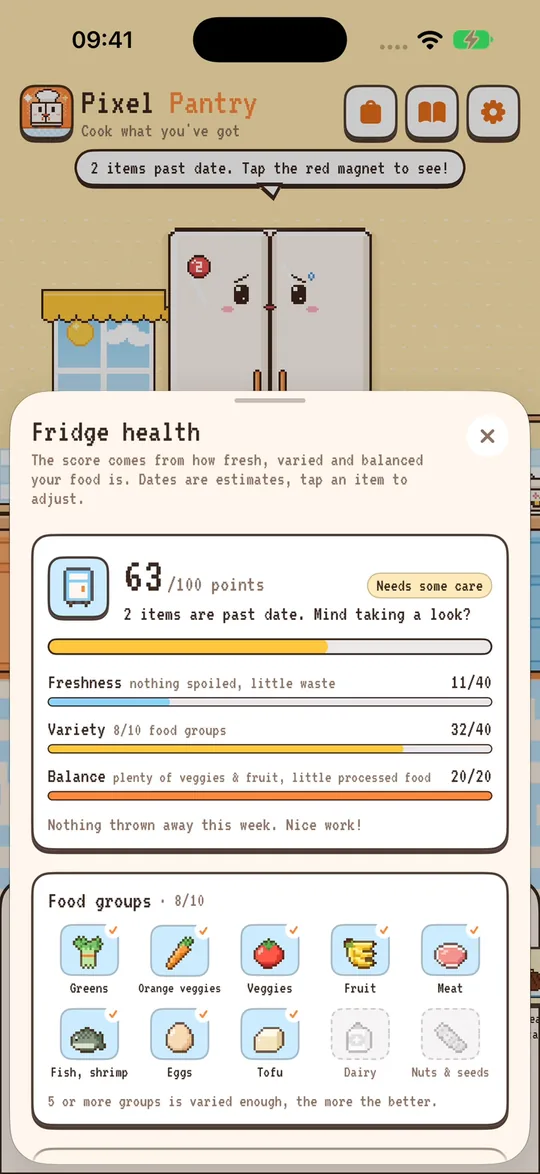
It knows when food is about to go bad
Every ingredient gets a sensible shelf life automatically, counted from the day you put it in. You don't have to type a single date.
- Yellow clock for “use soon”, red mark for “past its best”
- A fridge health score out of 100: freshness, variety and balance
- Tap “still fresh” to restart the clock, or change the shelf life yourself
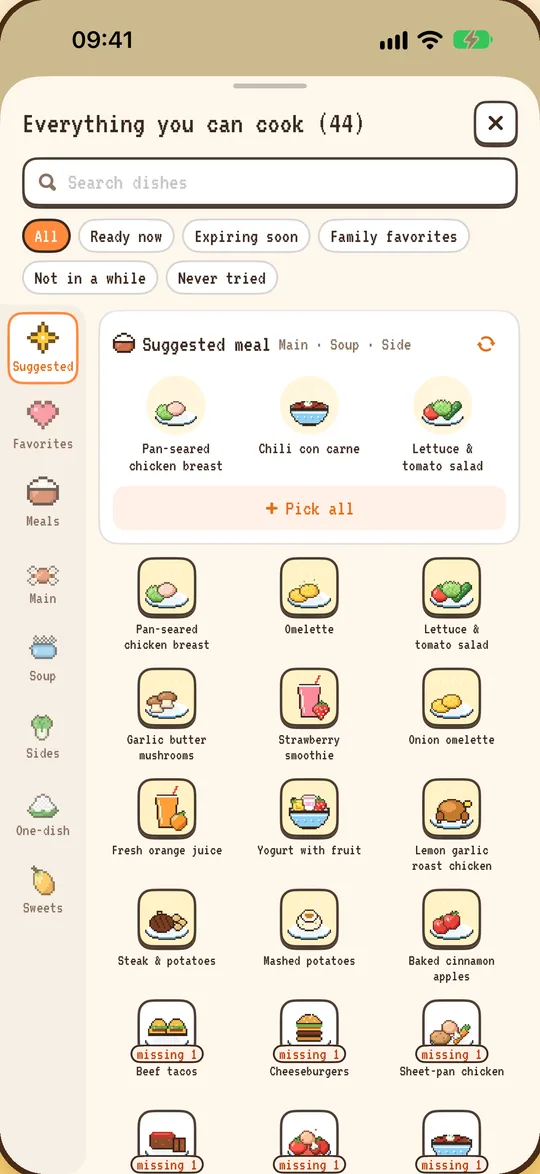
From table to a full meal
Put a few things on the table and pick 1, 2 or 3 dishes. Pixel Pantry builds a meal that uses them up first, with rice on the side. Not sure how to make it? One tap opens a video search for that dish.
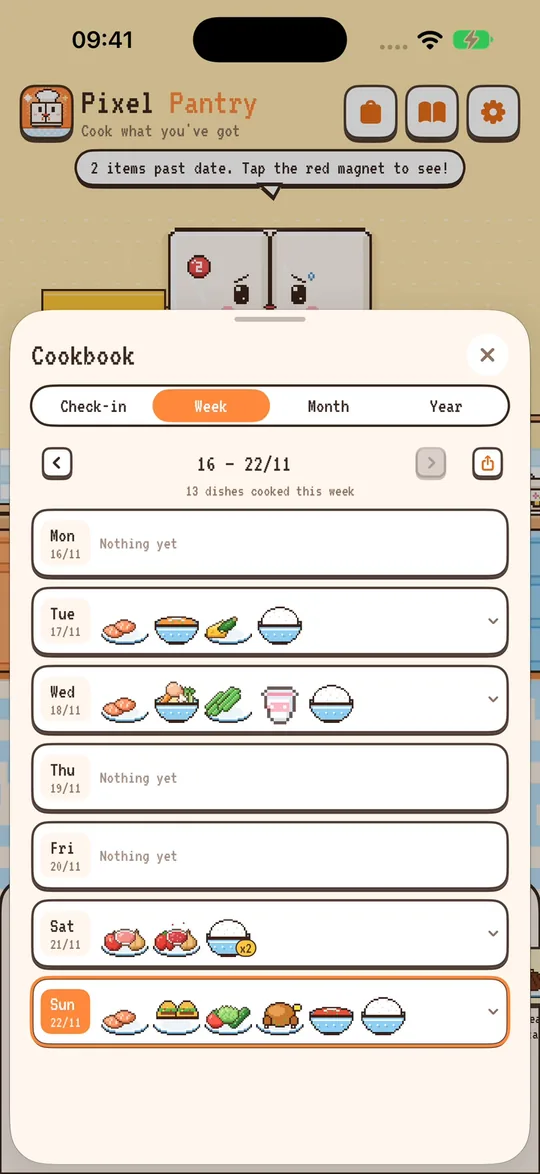
A little diary of every meal
Check in each day, keep your streak, and look back at the week or the month in tiny pixel bowls. Share a cute card of your kitchen with the family.
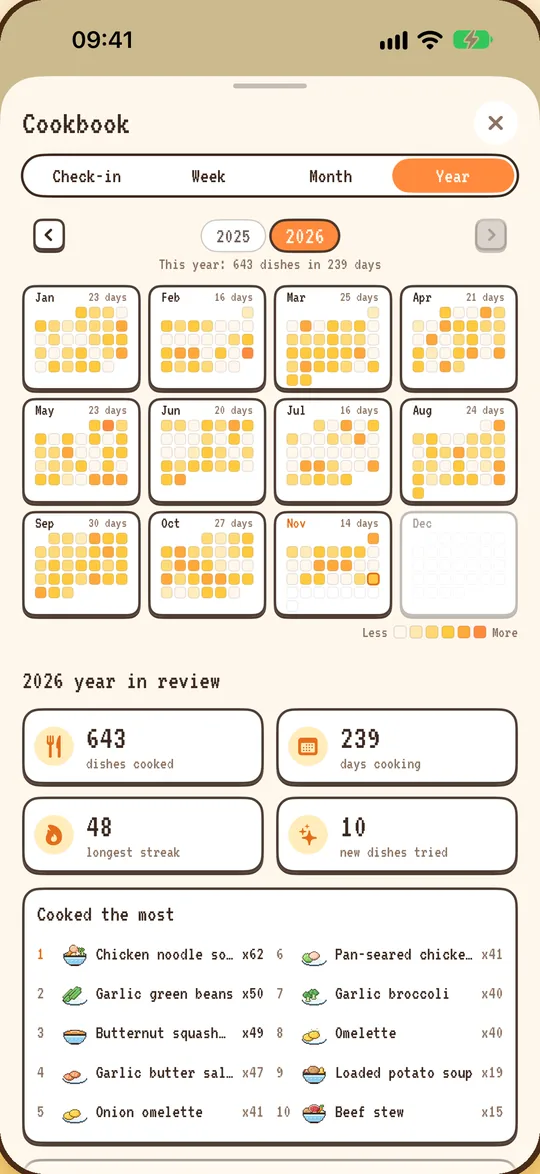
See your year at a glance
A colorful calendar of every day you cooked, your top dishes, your longest streak and which meal you cook most. Then share your year in one card.

Decorate your kitchen
Magnets, stickers, plants, a radio with lo-fi tunes. Earn decorations from daily check-ins, or dress up the whole kitchen with seasonal sets.
For keen cooks: calorie tracking, stats and food-expiry reminders
Everything above is free. Plus adds a few extras for people who like to keep track.
Calories & protein
An estimate for every dish, with daily rings for calories and protein in your cooking log.
Expiry reminders
A gentle notification in the late afternoon when something should be cooked today.
Use-it-first ideas
Dish suggestions put ingredients that are about to go bad at the top.
Streak freeze
Missed a day? One day a week is bridged so your streak survives.
Calorie and protein numbers are estimates for reference, not medical or dietary advice.
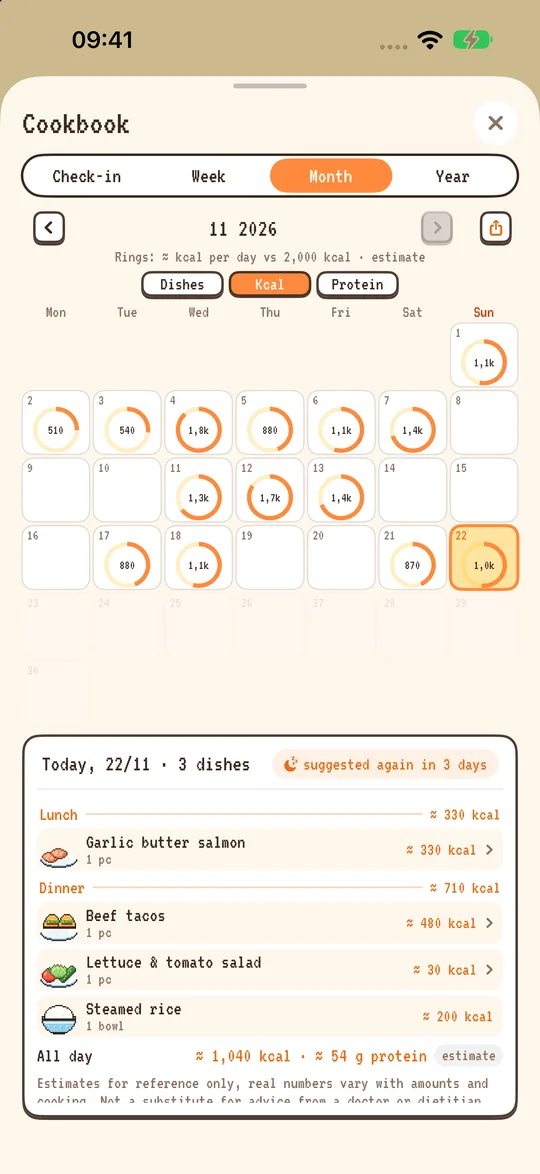
Calories and protein, counted for you
No food scale, no barcode scanning. Cook as usual and Pixel Pantry estimates every meal from its ingredients, then adds up your day.
- An estimate per serving for every dish and ingredient
- A whole-day total in “Today's table”, by portions eaten, with rice counted by the bowl
- Week view with a calorie bar per day; month view with daily calorie and protein rings
- Breakfast, lunch, dinner and late-night meals each show their own total
- Your numbers win: change the grams, calories or protein of any food

Set it once, and the fridge tells you before food goes bad
Turn on “Remind me before food goes bad” once in Fridge health. From then on Pixel Pantry plans your reminders by itself from the shelf life of everything inside.
- At most one notification a day, at 5 pm, before you start dinner
- Only on days something enters “use soon” or reaches its last good day. Quiet days stay quiet
- The note names what to cook first: “Spinach, eggs and 2 more should be used soon”
- Re-planned every time you close the app, so it always matches your fridge
- Runs on your iPhone: no account, no server, no internet needed
Little things that make cooking easier
All of these are free.
Today's tray
Pixel Pantry builds a balanced home meal from what's on the table: a main, a soup and a vegetable dish, with rice.
Cook several dishes at once
Pick two or three dishes and cook them in one go. Ingredients are shared, and you see what's missing before you start.
A fridge like yours
Seven fridge styles: side-by-side, top freezer, bottom freezer, mini, French door, four-door and Japanese multi-door.
Rice cooker and rice bin
Cook a pot, count the bowls, and mark the rice bin full, low or empty so you know when to buy more.
Snacks and leftovers
Eat ready-to-eat things straight from the fridge, and mark dishes with leftovers when you clear the table.
A gentle balance check
Today's table shows vegetables, fruit, protein and dairy, and nudges you when one is missing today.
Less waste, less “what's for dinner?”
Waste less food
Know what's inside before it wilts in the back. Older items get cooked first.
Made for families
One shared kitchen picture everyone understands, from grandma to the kids.
Free to cook. Pay only for the extras.
Free
The fridge, freshness tracking, dish ideas, cooking log, check-ins and the everyday kitchen. No ads.
Kitchen skins
Seasonal kitchens like Christmas and Lunar New Year. Yours to keep, no subscription.
Plus
Calorie and protein tracking, automatic expiry reminders, use-it-first ideas and streak freeze.
Questions
Is Pixel Pantry free?
Yes. The fridge, dish ideas, freshness tracking and cooking log are free, with no ads. Kitchen skins and Plus are optional.
Do I need an account?
No. There is no sign-up. Everything is saved on your iPhone and works offline.
How does it know when food goes bad?
Each ingredient has a typical fridge shelf life. Pixel Pantry counts from the day you add it and marks items that should be used soon. You can adjust it any time.
Where can I get it? Is there an Android version?
Pixel Pantry is free on the App Store for iPhone and iPad. There is no Android version yet.
Can I track calories with Pixel Pantry?
Yes, with Plus. Every dish and ingredient gets an estimated calorie and protein count, your day is added up from what you cooked and ate, and the cooking log shows daily rings for the month. The numbers are estimates, not medical advice.
How do the expiry reminders work?
Turn them on once in Fridge health (a Plus feature). Pixel Pantry then schedules up to one notification a day at 5 pm, only when something should be used soon. Everything happens on your iPhone.
Do I have to type expiry dates?
No. Each ingredient gets a typical shelf life automatically, counted from the day you add it. You can change it for any item, for free.
What does Plus include?
Calorie and protein tracking with stats, automatic expiry reminders, dish ideas that use food about to go bad first, and a weekly streak freeze. It is available monthly or yearly.
Made with love in a small kitchen
Pixel Pantry is made by an independent developer in Vietnam. It started with a question every family knows: “what should we cook tonight?”, and a fridge full of things nobody remembered buying.
We wanted something cozy instead of another spreadsheet: a little pixel kitchen that helps families cook what they have, waste less, and enjoy it. All art, music and sounds are made in-house.
Say hello
Questions, feedback, bug reports or press: we read every email.
We usually reply within a few days.

Free on the App Store
Fill your fridge in a minute and see what you can cook tonight.